RSS

How-To Guide

(0) New Functionality - Macsteel to Quote

You can now add “Macsteel to Quote” items to your cart and submit online quote requests for products that don’t have prices.

(0) Macsteel Expands Online Cash Sales to Gqeberha

Cash customers in Gqeberha can now enjoy a seamless shopping experience through Macsteel’s Online Shop.

(0) Cash Sale Customers: Understanding Macsteel’s Online Shopping Availability & Delivery Zones

At Macsteel, we’re always working to make your shopping experience as smooth and convenient as possible for our cash sales customers. While our online shopping service is already available in select regions, we’re actively expanding to bring this convenience to even more customers across South Africa.

Cash Sales Delivery Zones: What You Need to Know

Macsteel delivers within designated branch delivery zones. During the online registration process, our Online Shop automatically checks whether your delivery address falls within a supported area, and you will be notified during registration if delivery is available.

If delivery is not supported, you can collect your order from the nearest supplying branch or contact the E-commerce Team at ecommerce@macsteel.co.za to see if we can assist you.

Currently, online shopping for cash sale customers is available in the following regions:

  • Western Cape
  • Gqeberha
  • Bloemfontein
  • Phalaborwa

Online Cash Sales Delivery Zone Maps

Here’s how our delivery zones work for online cash sales:

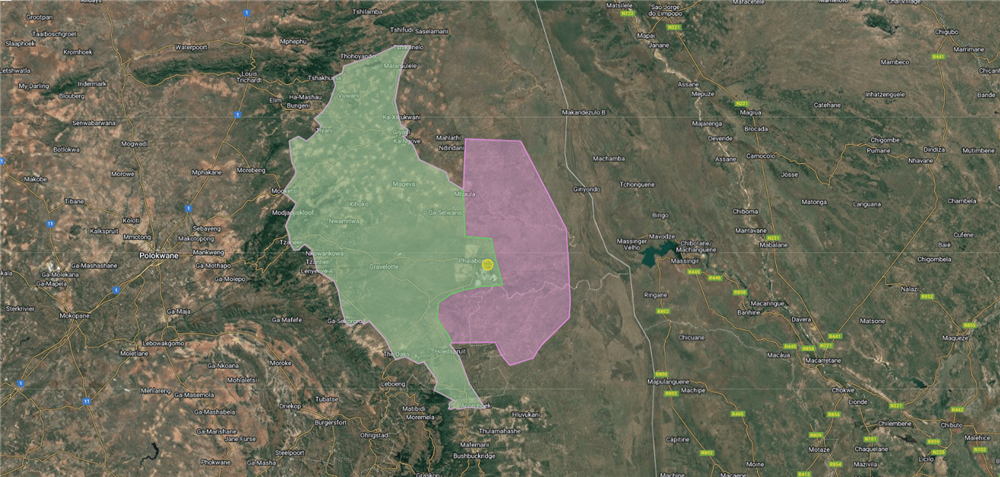
  • If your pinned address during registration falls within the pink zone, you're eligible for delivery or collection.
    Delivery fees may vary based on the weight of your order and distance from the supplying branch. Heavier orders may incur lower delivery fees. Currently, delivery charges only apply to the Cape Town branch.
  • The yellow zone is also a delivery and/or collection area, it just indicates the radius around the Macsteel branch. 
  • If your address falls within the green zone, collection is available, but delivery is not.

Western Cape

  • Delivery Areas (pink area): Greater Cape Town, east coast up to Struisbaai (including Betty’s Bay, Hermanus & Gaansbaai), Swellendam, Montagu, Ashton, Bonnivale, Robertson, Worcester, Ceres, Tulbagh, towns along the N7 up to Vredendal, west coast up to Papendorp and Strandfontein (including Doringbaai, Lambert’s Bay, Eland’s Bay, St Helena Bay).
  • Collection Only (green area): East of Swellendam or north of Montagu, Ceres, Tulbagh, or Vredendal.

WESTERN CAPE


Bloemfontein

  • Delivery Areas (yellow and green areas): Within a 5km radius of Bloemfontein (yellow area) including Botshabelo and Thaba Nchu (green areas)
  • Collection Only (pink area): Up to the Lesotho border (east), Maletswai and Noupoort (south), Oranjesrivier and Postmasberg (west, including Kimberley), and Bloemhof (north, including Welkom but excluding Kroonstad). 


    Bloemfontein

Phalaborwa

  • Delivery Areas (yellow and green areas): North up to Shigalo and Malamulele, west to Tzaneen, south to Acornhoek (including Hoedspruit), and east to the Kruger National Park border.
  • Collection Only (pink area): Customers within the Kruger National Park.

     Phalaborwa

Why Certain Regions Are Not Yet Supported

Macsteel’s Online Shop is being introduced in phases to ensure service excellence and customer satisfaction. Each region is evaluated individually in line with Macsteel’s broader service strategy, allowing for refinement of systems and ensuring consistent, reliable service.

If your nearest branch isn’t online yet, contact your local Macsteel branch. View branch details here: https://shop.macsteel.co.za/store-locator.

Note: If you’re unable to register online, your address may fall outside of supported zones. Contact the E-commerce Team at ecommerce@macsteel.co.za to check if we can assist or expand delivery to your area.

If You’re Based Outside South Africa

Currently, Macsteel’s Online Shop is only available within South Africa due to VAT and export documentation requirements. Customers in neighbouring countries are welcome to contact our Export Sales Team at +27 11 871 4500.

We also have branches in Ghana, Malawi, Mozambique, Swaziland, Zambia, and Angola. View our branch locator here: https://shop.macsteel.co.za/store-locator.

Looking Ahead

Macsteel is actively expanding online shopping capabilities to more regions. Should you need help or have delivery-related questions, our team is ready to assist.


 The Online Shop Team
📧 ecommerce@macsteel.co.za
📞 011 871 0300

(0) How to Buy from Different Macsteel Branches Online

Switch Between Buying from Macsteel Branches Easily with the “Change Buyer” Feature

(0) Cape Town Customers: Pipes, Fittings & Flanges Have Moved

All pipes, fittings, flanges, and valves are now available via Macsteel Fluid Control Cape Town.

(0) Hardware & DIY Now Available Online in the Western Cape

Hardware & DIY Now Available Online in the Western Cape - Stand a Chance to Win

(0) How to Create Saved Lists of Products You Order Regularly (Favourites)

How to Create Saved Lists of Products You Order Regularly (Favourites)

(0) Understanding What You See on Macsteel’s Online Shop When You’re Logged In vs Logged Out

On Macsteel's Online Shop, log in to get an experience tailored to your needs.

(0) Did You Know Account Customers Can Place Back Orders Online?

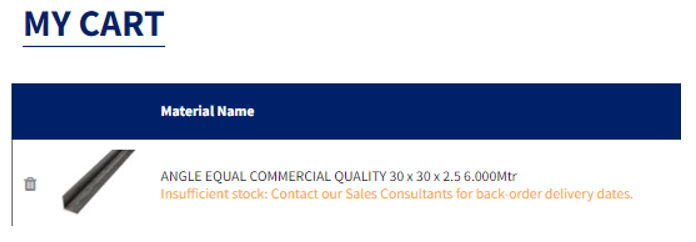
Did you know that, as a Macsteel account customer, you can place back orders online? This means that even if you see that an item is out of stock on Macsteel’s Online Shop, you can still add it to your cart and checkout. Macsteel will receive your order and source the goods for you.

If you do place a back order online, remember that the delivery dates you see on checkout may not be accurate as this item is out of stock – so please contact a Macsteel sales representative at your closest branch and they will be able to assist you and confirm the estimated delivery date for your backordered items.

If you are a cash sales customer, this particular benefit is not available for you and you won’t be able to place backorders online, but you are welcome to reach out to our sales team directly. They'll happily explore options with you to accommodate your needs. We believe in finding solutions that work for everyone.


Here are the 4 easy steps you can follow to place a backorder online:

  1.       Macsteel account holders can place backorders online for materials which are out of stock. Simply add “out of stock” materials to your cart by entering  the number of items you would like to order and click the “Add to Cart” button:

  1.       Once your order is placed online, these materials will be placed on backorder. Macsteel staff are notified that you would like these goods.

  1.       Contact a Macsteel sales representative at your closest branch to find out when the estimated delivery date for your backordered items will be.
  1.       Once the goods are at your closest branch, they will be delivered to you as usual.


Summary of Back Order Information:

Delivery Dates:  The delivery date that will display at checkout for your order will not apply to backordered materials - please contact your sales clerk to confirm the estimated delivery of your backordered items.  

Backorders Not Applicable for Cash Sales: Cash sale customers who do not have a Macsteel Account cannot place backorders online.

Items on Special: Materials offered on special cannot be backordered as they are on special.


For any queries, please contact the Macsteel E-commerce Team on 011 871 0300.

(0) Real-Time Order & Quote Details Now Available After Checkout

In today's fast-paced e-commerce landscape, ensuring a seamless and efficient customer experience is paramount. To further enhance our Online Shop’s user-experience, you can now view the details of your order or quote directly after checkout. This change aims to simplify the post-order process, making it easier for you to access essential information without navigating through additional pages.


Let's delve into the exciting improvements that this enhancement brings:


♦ Order & Quote Details at Your Fingertips

Prior to this, you would need to click on the "See Details" button, or you would have to navigate to the “Orders” or “Quotes” menu in order to view the details of your order or quote. However, with the new enhancement, as soon as an order or quote is complete, all pertinent details will be immediately displayed on the screen.


♦ Convert Quotes To Orders At Just A Click Of A Button:

Once you have placed your quotation online, the option to convert your quotation to an order is now readily accessible – all you will need to do is click the "Convert" button which can be found at the bottom of your screen within the details of your quote.  This improvement ensures a smoother and more efficient experience for customers who regularly create quotations.


♦ Conveniently View Your Order Reference Number And Easily Save Your Order As A “Favourite”:

To improve your user convenience, your order reference number is now included within your order details to assist you to quickly reference or track your orders when needed. Additionally, you can now save your order as a “Favourite” by clicking the "Save to Favourites" button available after checkout - this simplifies the process of adding preferred products to a personalised wish list, making it easier for you to revisit and purchase the same items again.


The Benefits Of This Enhancement:

The introduction of real-time order and quote details presents many benefits for our esteemed customers:

  1. It Saves You Time: Easily access all relevant information immediately after completing an order or quote, eliminating the need to navigate through multiple pages.
  2. Swiftly Convert Quotes To Orders: When placing a quote online, the "Convert" button is now readily available, saving you time and effort.
  3. Order Tracking Made Easy: The inclusion of your order reference number upfront makes it easier for you to track your orders.
  4. Seamless Wishlist Management: The "Save to Favourites" button streamlines the process of creating and managing personalised wishlists.


At Macsteel, we are committed to continuously improving our Online Shop to provide the best possible experience for our valued customers. The real-time display of order and quote details marks a significant step forward in enhancing user convenience and satisfaction. By eliminating unnecessary clicks and promptly providing essential information, we aim to make the post-order process as smooth and delightful as the shopping journey itself.


We trust that it will add more value to your shopping experiences.

 

Cash customers can now register to shop online in the Western Cape region

Cash customers can now register to shop online in the Western Cape.

(0) Pipes, Fittings, Flanges & Valves Now Available via a Single Fluid Control Login for Gauteng Customers

Johannesburg Customers: We are consolidating our stock and you can now buy all pipes, fittings, flanges and valves from Fluid Control Gauteng.

(0) Save When You Buy Online - Keep Track of Your Online Savings Year-To-Date and All Time.

By buying online, you can save money with each purchase. In order to provide all our customers with better overall service we want to incentivise you to purchase via the Online Shop.

(0) We’re Changing The Way Items Are Added To Cart

We’re changing the way materials are added to cart. You will now see an Add to Cart button to add materials to your cart instead of them being added automatically.

(0) New Functionality: Statements Now Available Online

Macsteel's Online Shop is is proud to announce that statements are also now available for you to access and download online.

(0) We've Updated the Look and Feel of the Online Shop.

We are proud to announce that our Online Shop has a new look!

(0) New Functionality: You Can Now Find an Order Searching by Purchase Order Number

New Functionality: You Can Now Find an Order Searching by Purchase Order Number

(4) New Functionality: Price List Downloads Now Include Weights & Pricing Notes

How to Download Price Lists Online - Now Including Weight & Pricing Notes

(0) How to Convert a Quote to an Order

New functionality has been developed, so you can now easily convert your quotations into orders.

(0) How To Create a Quote

How To Create a Quote